







SiriusXM Music for Business
SiriusXM Scheduling Portal

Scheduling Portal Setup
Use the SiriusXM Scheduling Portal to remotely program and manage your SiriusXM streaming players. The portal allows users to program a player, or group of players, to automatically change channels based on time and day settings. This is the best way to keep your SiriusXM music fresh and interesting.
This video will walk you through:
- Creating a portal account
- Adding a player to the portal
- Creating a music schedule
- Assigning the music schedule to a player
- Enabling remote scheduling on your players
Scheduling Portal Quick Start Guide
- Step 1: Create a Portal Account
- Step 2: Add Your Radio
- Step 3: Create a Schedule
- Step 4: Assign a Schedule
- Step 5: Enable Remote Scheduling
How to Create an Account in the SiriusXM Scheduling Portal
- Navigate to the SiriusXM Scheduling Portal
- The scheduling portal is different than the player portal, which is where you change channels, select favorites, etc. The Scheduling Portal is for programming your player(s) to automatically change channels and volume over the course of a week’s time.
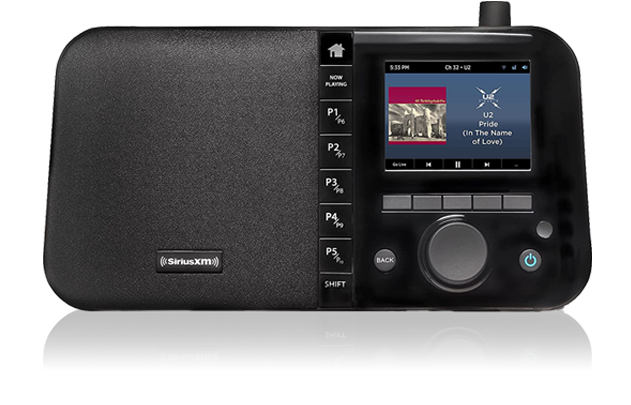
- In order to create a schedule, you must have one of the scheduling capable players below.

- How to Create an Account
- You will need to register with the portal to create an account.
- Click “Click Here to Register” and complete the Sign-Up Form.
- Click the blue “Sign Up” button
- The website will flash a confirmation if your registration was successfully completed.

- Enter your Email and Password
- Once registration is complete, enter your Email Address and Password
- Click the blue “Login” button to log in to the portal

Adding a Radio to the Scheduling Portal
- Set your Time Zone
- This is an important first step. Setting your time zone ensures the portal changes channels at the proper time.
- Select “Time Zone” in the left-hand navigation.
- Select your time zone and click “Save”

- Adding a Radio
- The second thing you’ll want to do is add your Radio to the portal.
- Click the “Plus Sign” on the right had side of the page to launch the Add Radio pop-up.

- Complete the “Add Radio” pop-up form and click “Save” when complete.
- Name: Type in a name that will help you identify the radio.
- Serial: The location of your serial number depends on the type of radio you have:
- SXBR2:The serial number is in the “Radio Info” menu (Home > Settings > Radio Info).
- SXBREO, SXBREW, SXBR3: The serial number is on a sticker on the bottom of the radio.
- Model: The model of your radio. The model is listed on the bottom of the radio.
- Select Schedule: If you already have a schedule created, you can apply it here. If not, skip this for now.

- The portal will “Create the Radio” and add it to the Radio List

How to Create a Schedule
- Click “Schedules” in the left-hand navigation to access the “Manage Schedules” section
- Enter a name for the schedule.
- Click the blue [+ Day Part] to begin scheduling time slots.

- From the “Add a Day Part” pop-up box
- Select a start time. This is the time you want the channel to begin playing in your business.
- Select a channel. This is the channel that will begin playing at the selected time.
- Select your desired volume level.
- When complete click “Save”

- The Day Part will appear in the schedule.
- Continuing adding as many Day Parts as you wish.
- Select your Close time
- This is when your radio will shut off for the night.
- When all your Day Parts are added, select the “Pencil Icon” on the “Closed” row to program the radio to stop playing music for that particular day.

- Copy Day Part to all days of week, or create different Day Parts by day
- If you want to use the same Day Part for all days of the week, click [+ COPY TO ALL DAYS]
- If you want the Day Parts to be different by day, select a different day of the week and build your Day Parts for that day.

How to Assign a Schedule to a Radio
- Click on “Radios” in the left-hand navigation
- Locate your radio from the list and click the “Pencil Icon” to launch the “Edit Radio” pop-up box.

- In the “Edit Radio” pop-up box, use the “Select Schedule” drop down to locate your desired schedule.
- Highlight your desired schedule and click “Save” to complete.
- The player will begin playing the assigned schedule in a few minutes.

How to Enable Remote Scheduling on Your SXBR2 Player
Now that you have your schedules created, you’ll need to enable Remote Scheduling on your GDI-SXBR2 Player.
- Navigate to “Settings” from the home menu

- Navigate to “Remote Scheduling” and push the dial to select

- Select “Enable Schedule” and press the dial to check the box.
- The player will begin playing its assigned schedule in a few minutes
- Note: Go to siriusxm4biz.com to change and update schedules

Frequently Asked Questions
What equipment do I need to get SiriusXM Radio for business?
You can listen to SiriusXM business several different ways. If you have questions, we have an inside sales team ready to guide you to the perfect player for your business. Check out the information below, or give us a call a 800-684-7050.
- The SiriusXM App – You can use virtually any Apple or Android mobile device and listen to SiriusXM Business without purchasing hardware. When you sign up for a business subscription, we will send you a username and password that will connect you to the SiriusXM Business service. Simply download the app to your mobile device, enter the username and password that we provide, and you’ll turn your mobile device into your SiriusXM Business player. See more here: App Store | Google Play
- SiriusXM Internet Player – There are several SiriusXM internet players made specifically for your business. Each player is made to plug and play with any existing audio system or phone system music on hold input. Please contact Dynamic Media for a comprehensive quote for SiriusXM Music for Business in your business.
- SiriusXM Satellite Players – For those business unable to connect to SiriusXM using a high-speed internet connection, we have satellite players that will do the job for you. The satellite players require a small antenna (3” x 3”) to be placed on the outside of the building. Once placed, the player will start receiving service directly from the satellite, bypassing the internet altogether. As with the internet players, the satellite receivers connect to any audio system or phone system for music on-hold.
What is SiriusXM Music for Business?
SiriusXM Music for Business is a licensed business music service available in satellite or internet delivery. The Internet service provides 200+ channels of SiriusXM commercial-free music. The service is delivered over the internet to a PC or a SiriusXM internet radio. The satellite service provides that provides 70 commercial-free channels made available to nearly all American businesses located in the continental United States.
What will I hear on SiriusXM Music for Business?
SiriusXM Music for Business offers a huge variety of stations you’ll never hear on regular radio or from other background music providers. Most channels are unique and innovative SiriusXM originals, which include totally new in-store music programming. Internet Channel Guide | Satellite Channel Guide
Why do I have to pay more for a business subscription?
Use of music in a business or as music on hold requires the payment of royalties to ASCAP, BMI, GMR and SESAC, the organizations that represent the music copyright holders. These royalties are included in a commercial subscription. For more information on these royalties please visit www.ascap.com, www.bmi.com, www.globalmusicrights.com and www.sesac.com
Why is SiriusXM Music for Business so much less expensive than other background music providers?
SiriusXM has 26 million consumer subscribers, which allows them to spread the costs of providing the music over both consumer and business customers. All the other music for business providers only sell to businesses, which means they have to charge more to cover their costs. In short, the extensive volume of SiriusXM customers allows business users to enjoy a much lower cost for a superior product.
Can I install the equipment myself?
Yes. An understanding of basic electronics essentially over qualifies you to install your business radio. Important to note, the music antenna must be mounted external to the building with a clear view of the sky. If you choose to self-install the radio, Dynamic Media will provide every part you will need to complete the installation, along with printed instructions and 800-phone support.
Do I have to buy equipment from Dynamic Media?
Dynamic Media will provide a subscription regardless of where you purchase your equipment. Dynamic Media understands the importance of music for your business, and thus provides advance replacement of any equipment issues covered by DynamicCare warranty. Purchasing your equipment from Dynamic Media provides a “one-stop-shop” for all of your in store music or music on hold needs.
Do I have to commit to a long-term contract to get SiriusXM service?
No. Over 98% of SiriusXM’s customers keep the service once they try it. Because of this high retention rate, SiriusXM does not require you to sign an agreement that commits you to any term. Your employees and your customers will absolutely love it. It’s nothing short of addictive.
Does SiriusXM Music for Business have commercials?
SiriusXM for Business music channels are commercial-free. Today’s FM stations carry 18 minutes or more commercials per hour.
How do I make sure the channels with inappropriate content and themes are blocked?
Upon order, your Dynamic Media account executive will provide the option to block channels with channels that are not “business safe.” If you’d like to block additional content that does not fit the brand of your business, most SiriusXM radios allow you to block individual channels using the radio’s menu. Please refer to your radio’s manual for instructions on how to do this, or contact your Dynamic Media representative at 1-800-684-7050. It’s our support that sets us apart.
How is SiriusXM Music for Business programming different from regular radio?
The biggest difference is that SiriusXM Radio has commercial-free music channels. What this means for you is that SiriusXM offers you music the way it should be and the way the artist intended it; without a single commercial interruption. Simply put, SiriusXM Music for Business has a breadth and depth of programming unavailable on regular radio.